Does Kindle Fire Continue Downloading If Asleep UPDATED
Does Kindle Fire Continue Downloading If Asleep

The Amazon Kindle has ballsy battery life, with the Due east Ink models lasting for weeks without recharging. Only could y'all go more bombardment life by completely powering information technology down? Maybe.
The Amazon Kindle (excluding the Kindle Burn) and other E-Ink readers are ofttimes touted for their epic battery life. The new Kindle Paperwhite is being advertised with eight-week battery life on standby. How do they achieve this? Role of the secret is in how the E-Ink brandish works. Unlike LCD screens, which go blank when de-energized, an E-Ink screen doesn't need electricity to brandish an image continuously. It only uses power to create the image on the screen. E-Ink screens consist of millions of tiny microcapsules filled with pigmented chips. When an electric charge is practical to a microcapsule, certain pigmented chips ascent to the surface, making them visible. After the image is configured, it's more or less permanent until it is "erased" by more than electrical charges (sort of like a Magna Doodle.) This is why an Amazon Kindle with Special Offers can display an advertisement on the screen when it is in slumber fashion while consuming little to no battery life.
With that being said, the Kindle tin can be turned completely off when you are not using it. But should you? Amazon Kindle customer service claims that it's not necessary to power down the Kindle to maximize the battery life. Merely some Kindle owners disagree. Read on for the details of the contend.
Kindle Power Push Functions

The Power Button on the Kindle Paperwhite
The Kindle power button/switch has a few different functions. Though the location of the push is dissimilar across the various models, the functions are largely the same:
- Kindle Sleep Mode – The Amazon Kindle can exist put to slumber by leaving it inactive for 10 minutes or apace pressing and releasing the power push button. This volition dim the backlight (if present) and brandish a screensaver or ad.
- Powering Off the Kindle – To completely ability downwards the Kindle, press and hold the power button or power switch for 10 seconds until the screen goes blank. To turn information technology back on, press the power button again.
- Restarting the Kindle – If the Kindle is unresponsive, you can restart it by removing information technology from a power source (if continued) and pressing and belongings the power button or switch for 20 seconds.
In sleep or standby mode, the Kindle uses a tiny amount, if any, of bombardment power. Amazon claims that bombardment life is "equally long," whether in slumber mode or turned off. Theories exist that both back up and counter this assertion.

Kindle Paperwhite with Special Offers in Sleep Style
The biggest business organization is with the WiFi/3G connectivity. Some Kindle owners have claimed that their router nonetheless shows an active WiFi connectedness when the device is in sleep mode. Notwithstanding, in my tests, the Kindle promptly disappears from the wireless clients from my Airport Utility later on putting it in sleep mode.

Kindle Paperwhite turned off.
At that place is also some question whether the Kindle periodically checks for updates or new books while in sleep mode. Co-ordinate to an Amazon Customer Service forum mail service from 2009:
Kindle'south wireless point uses depression power while in sleep style and then that your subscriptions can download overnight. If yous are in a low coverage surface area, this could cause the device to use more than battery power as it continually tries to maintain a signal. Unless you are subscribed to periodicals that yous want to receive overnight, we recommend turning wireless off (Press the Carte button and select "Turn Wireless Off" of the menu options) before leaving the device in sleep mode. This will further conserve bombardment power.
Kindles may have been redesigned to avoid this bombardment drain issue, but if in uncertainty, you can e'er turn off wireless when you are not downloading content. In theory, this should guarantee that your Kindle uses the same amount of power in sleep mode as it does when it is powered off (i.e., none.) Yous can plow off wireless by activating Airplane Style in the Settings Menu.
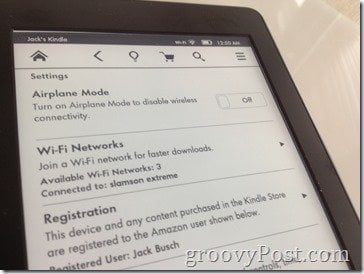
Kindle Paperwhite Airplane Mode
Those in the pro-sleep, anti-ability off camp too merits that it's not only unnecessary to ability downwards the Kindle, merely it's disadvantageous. Shutting down and starting up the Kindle likely requires more ability than merely resuming from the sleep state. Furthermore, powering downward the Kindle with a long-press of the ability button is akin to a hard shutdown (e.chiliad., pulling the plug on your computer) and tin can chance corruption or loss of data (e.m., notes, settings, last page read, etc.) Personally, I'm not sold on the risks of powering downwardly—I think that the Kindle shutdown control is smarter than that and probably won't cause damage unless your Kindle is locked up for another reason and requires a difficult restart (20-second power button press.)

DOWNLOAD HERE
Posted by: youngfouttich1937.blogspot.com

Post a Comment for "Does Kindle Fire Continue Downloading If Asleep UPDATED"